
The Omni Group has released OmniFocus 2 on the iPad alongside Apple’s iOS8 update. I've just downloaded it and started to mess with it a few moments ago. Here are some brief things I've noticed ...
It’s looking very nice. The iPad has acquired the very slick look of its iPhone and Desktop brethren. The general scheme now matches the rest. The three dots in a repeat circle is so wonderful that I found myself not using the iPad previous to the update because of it.
Here’s an example of my Communications Perspective in action:

Also neat is how the task editing screen has been completely revamped:
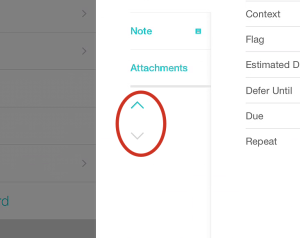
You can also move from one task to the next using the arrows highlighted in the image below:
In addition, there is new functionality to the iPad that was previously only available on the Desktop (pro version available as an in-app upgrade):
- Create Perspectives
- Edit Perspectives
- View Project-based Perspectives - Woot!
(Off to call Mom & Dad ...)