

Ulysses is an excellent writing tool. It can help you store and organize a large amount of writing. It provides tags, folders, smart searches, and more.
However, there are more often times that I prefer to link to a specific document. In this way, I can link to that file from OmniFocus or elsewhere.
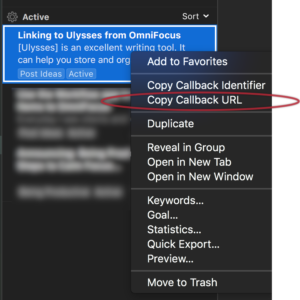
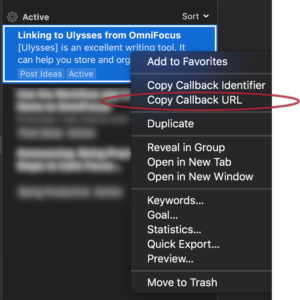
I struggled with Ulysses not having this feature until I reached out to their support team. Apparently, the feature does exist but is hidden. To access it:
- Hold (Option).
- While holding (Option), Control-click the file you want to link to.
- Select “Copy Callback URL”:
At this point, you can create a task in OmniFocus and link to it from the note field:
- Select a task to include the link.
- Open the note field (Command-‘).
- Paste the link (Command-v):
 Task linking to Ulysses from OmniFocus
Here I have a task assigned to a project for writing posts and a @Draft context. It is repeating by Defer Again daily.
To access the file:
- Select the link.
Alternatively, I like to use Jesse Hollington’s link script, which is likely my most used Applescript. Using it, I can select the task, and type my chosen keycommand (Option-Command-Space) to open the link. I do not need to open the note field. I do a more in-depth discussion here, but I’ve since changed the assigned hotkey.






