


Sometimes I want to see all of my options. I want to see the Inspector, the Toolbar, and the Sidebar.
Other times, I don’t. I just want to see a simple list of tasks.
Jumping back and forth between these states normally takes a bit of work. Minimizing the Sidebar, Toolbar, and Inspector, as well as resizing are all little things I don’t want to do.
So, I’ve made a Keyboard Maestro snippet to do all of those with a single keystroke. It’s a bit of work to set up, but once done, it’s done. Using it is simple. I type Option-q to expand everything. I type Option-q again to minimize:

Here’s the macro I’ve put together. Feel free to mess with it. As always, I take no responsibility for any form of wanton destruction that may occur as a result of your messing with your computer. This set up seems to work for me, but for all I know, it will summon rabid kittens from within your computer.
Let’s set it up. In Keyboard Maestro,
- Create a Group for OmniFocus:
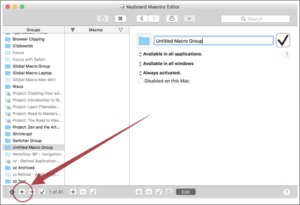
- Title it:
- Select “Available in all applications” and change it to “Available in these applications”.
- Select the green + button and select OmniFocus:
You now have a folder that will let you make Keyboard Maestro macros specific to OmniFocus. As an aside, I have numerous folders dedicated to individual applications:
- Next, download the snazzy bit of macro I’ve put together.
- Then, while you are in the Group we just created above, import the macro:
It will import in a disabled state. To enable the macro,
- Toggle the X into a checkmark:
You ‘re now ready to go.
Note, there is some wonkiness to the script. If one of the Sidebar, Inspector, or Toolbar are open or closed while the others are not, then the macro stops. In that case, you have to manually set them all in the same state using a menu or key command for it to work again.






