Return to Blog

Simple tip for iOS - Expand or Collapse All

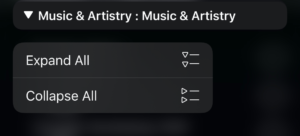
A useful trick to change the view of your tasks in the iOS version of OmniFocus is to expand or collapse the visible groups.

To do so, simply:

  • Press and hold on any of the disclosure triangles on the screen:

  • Select the option you want:

To get:

You can then choose the group you want to view more readily, rather than scroll through a long list of tasks.

Divider

Recent Articles

AI vs Agency

Feb 28, 2026

I’ve got a problem. I don’t know how this works. I don’t know how to write this. I don’t know the best order. ...

Bottom card separator

On Decision, Indecision

Feb 13, 2026

Check out the podcast version of today's newsletter at Rhythms of Focus (Apple Podcasts, Spotify). Kourosh “Sh...

Bottom card separator
Return to Blog

Publications

Over the years, I’ve written five main works on productivity. Sign up for the Weekly Wind Down newsletter to get free previews.

Kourosh Dini courses Kourosh Dini books
See all the publications